The Best Way to Track Parivahan Application Status
Whether you’ve applied for a Driving License, Vehicle Registration, or Transfer of Ownership through the Parivahan Portal, it’s essential to keep track of your application’s status. Fortunately, the Parivahan Portal offers an easy and efficient way to track the progress of your application.
Here’s a step-by-step guide to help you track the Parivahan application status for various services.
Visit the Parivahan Portal
To begin tracking your application status, you’ll need to access the official Parivahan Portal.
Go to the Parivahan Portal: Open your browser and visit Parivahan Portal.
Navigate to ‘Online Services’: On the homepage, click on ‘Online Services’.
Get Challan Details:
Select ‘Track Application Status’: Under the ‘Online Services’ section, click on ‘Track Application Status’.
Select Your State
Since the Parivahan Portal is connected to regional RTOs, you need to choose the state where your application was processed. Follow these steps:
Enter Application Details
Once you are on the application tracking page, you will need to provide specific details related to your application. These include:
Tip:
- If you don’t have the application number, check your email or SMS notifications. You should have received a confirmation when you submitted your application.You can also read: How to Get a Verified Digital Driving License (DL) Parivahan
Track the Status
After entering the necessary details, click on ‘Submit’ or ‘Track’. The portal will show you the current status of your application. The status can include information such as:
Application Submitted: Your application has been successfully submitted and is awaiting processing.
Under Processing: Your application is being reviewed by the RTO.
Approved: The application has been approved, and you can expect your documents soon.
Rejected: If there’s an issue with your application, it may be rejected, and you’ll be asked to correct the details.
Check Status on the mParivahan App
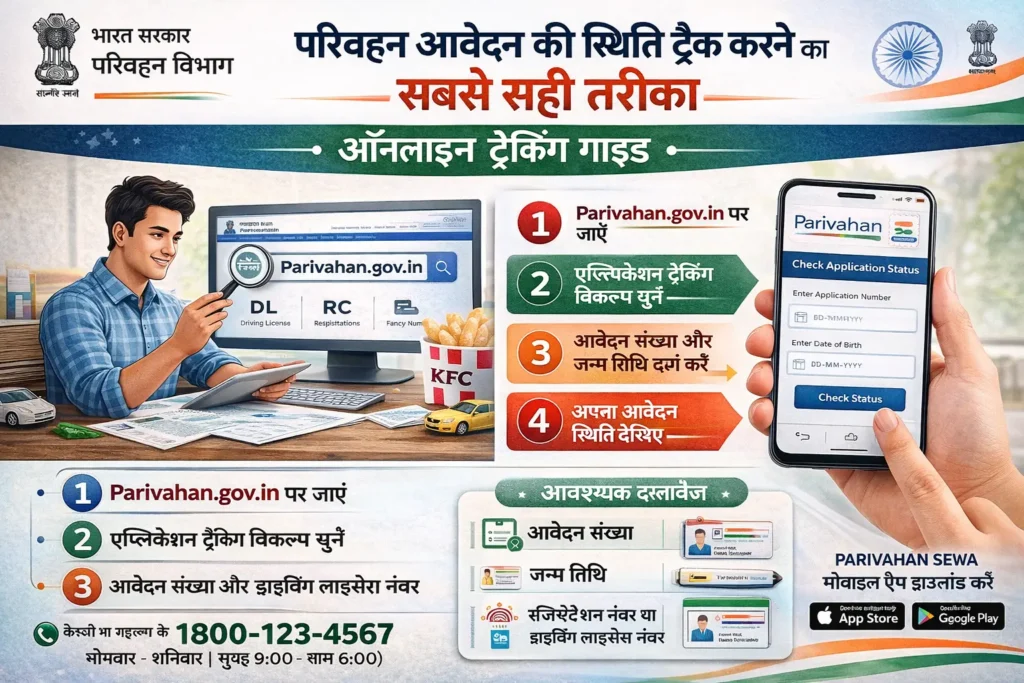
If you prefer using a mobile app, the mParivahan app is a great way to track the status of your application. It’s available for both Android and iOS.
Install the mParivahan App from the Google Play Store or Apple App Store.
Open the app and navigate to ‘Track Application Status’.
Enter the application number or other required details, such as your date of birth.
The app will display the status of your application in real time.
Check Your Email or SMS Notifications
Once you’ve submitted your application, you will receive email or SMS notifications regarding the progress of your application. These notifications will inform you of any updates, such as when your application is approved, ready for collection, or if additional documents are required.
FAQs
Final Words
Tracking the status of your Parivahan application is quick and easy through the Parivahan Portal or the mParivahan app. Simply enter the required details and stay updated on your application’s progress. This ensures you’ll know when your Driving License, Vehicle Registration, or any other service has been processed, approved, or needs further action.