Why Doesn’t mParivahan Match Vahan Portal Data?
Parivahan Portal If you’ve ever tried using the mParivahan app to check vehicle details, like registration or challans, and found that the information doesn’t match with what’s available on the Vahan Portal, you’re not alone. This can be confusing, especially since both platforms are supposed to offer the same services.
So, why does this happen, and how can you make sure your data is correct? Let’s break it down in simple terms.
Data Synchronization Delays
The most common reason for discrepancies between mParivahan and the Vahan portal is data synchronization delays. Both platforms pull data from the same government databases, but:
The Vahan Portal may have the most up-to-date information.
The mParivahan app could be showing outdated data due to a delay in synchronization.
In some cases, updates made on the Vahan Portal, like changes in vehicle registration details or challan payments, may not immediately reflect in the mParivahan app due to the time lag in syncing between systems.
Regional Discrepancies
India has a vast network of transport offices, and sometimes data entry can vary across different states and regions. For example:
Some states may update their data faster than others.
There could be regional errors or gaps in data input, causing mParivahan to display incomplete or incorrect information that isn’t reflected in the Vahan Portal.
The Vahan system is centralized, but regional authorities manage the data input, which means there can be differences in how quickly or accurately the data is updated across states.
Different Databases and Systems
While both mParivahan and Vahan are connected to government databases, they may access different versions or parts of the database. Vahan is the back-end database used by RTOs (Regional Transport Offices) for official records. The mParivahan app, on the other hand, serves as a front-end user interface, and it may rely on a different data pull mechanism.
Issues with Data Entry or Validation
Human errors during data entry can also lead to discrepancies. Sometimes, information entered into the system, like vehicle registration numbers or license details, might have minor errors that aren’t immediately caught. This can result in:
Such errors can cause the mParivahan app to show incorrect or mismatched data compared to the official Vahan Portal.
Network or App Issues
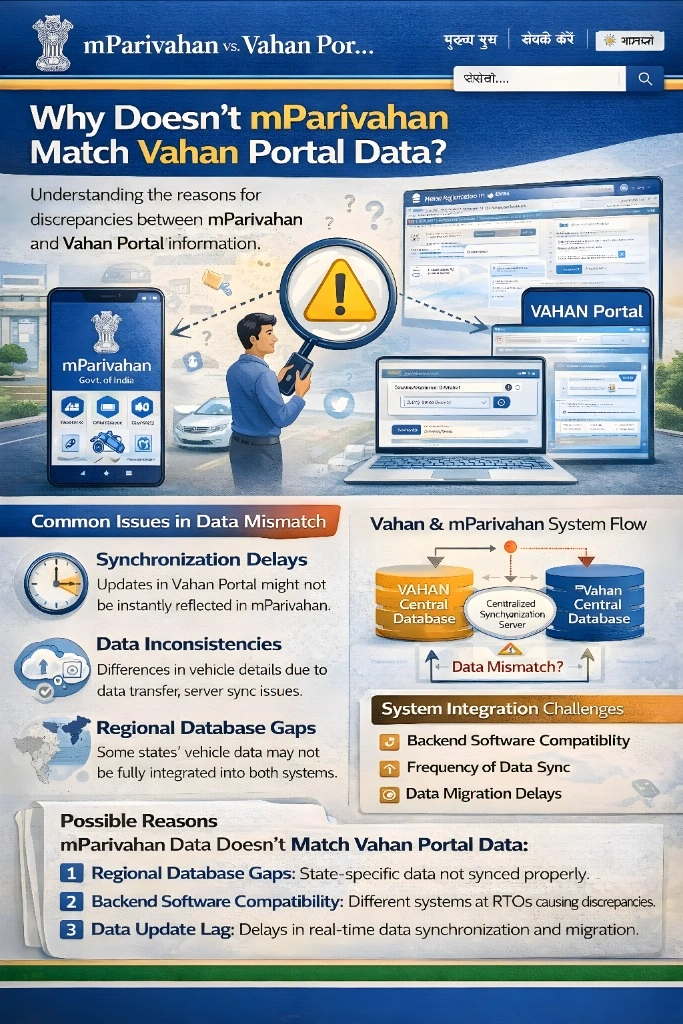
Sometimes, the issue is more technical than data-related. Both the mParivahan app and the Vahan portal rely on stable internet connections to pull data from government servers. If your internet connection is slow or the server is down, the app might not be able to fetch the correct data, causing discrepancies between the two platforms.
Additionally, app updates can sometimes cause bugs or glitches that affect how data is displayed. If you’re experiencing issues, it’s worth checking if an app update is available.
How to Ensure Correct Data?
To avoid issues with mismatched data between mParivahan and the Vahan Portal:
Wait for synchronization: If you’ve recently updated information on the Vahan Portal, give it some time to reflect in the mParivahan app.
Contact your local RTO: If the discrepancy seems like a serious issue (like incorrect challan details or missing registration data), visit your local RTO office to verify and correct the records.
Double-check your details: Ensure that there are no spelling errors or typos in your vehicle registration number or license details when you input data into either system.
FAQs
Final Words
The data mismatch between mParivahan and the Vahan Portal is usually due to synchronization delays, regional differences, or minor data entry errors. While Vahan is often more accurate and up-to-date, mParivahan offers a convenient way to access vehicle information on the go. If you notice discrepancies, give it some time, check your details, or contact your local RTO to resolve the issue.