Common Parivahan Portal Errors and How to Fix Them
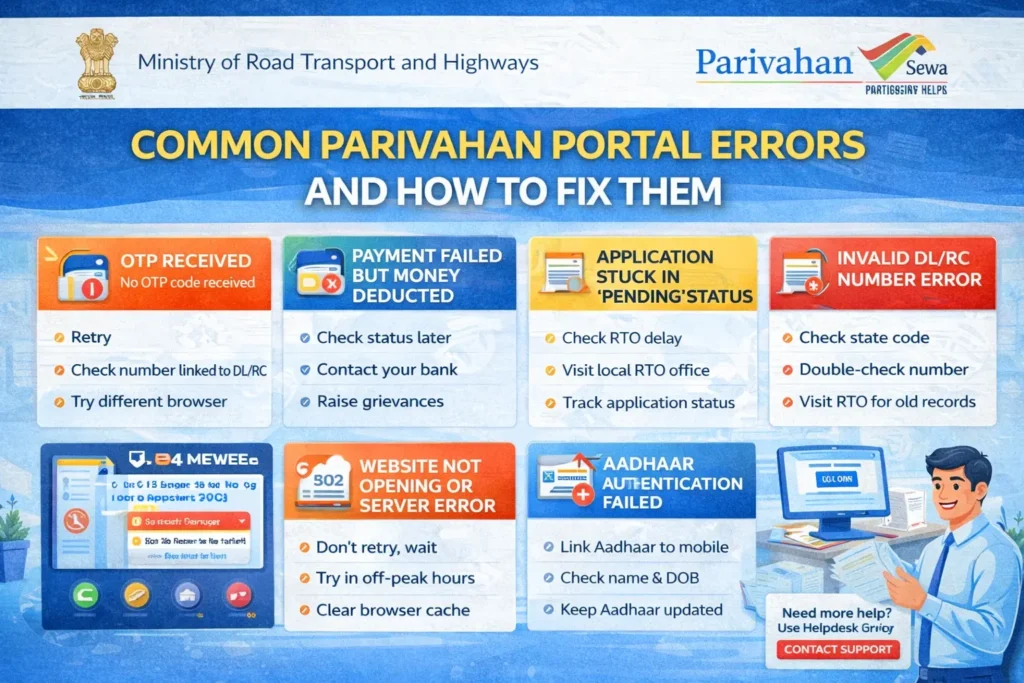
The Parivahan Portal is an essential tool for managing vehicle-related services like driving licenses, vehicle registration, and more. However, users may sometimes encounter errors while using the platform. These errors can be frustrating, especially when you need to access or update important documents.
Don’t worry! Here are some common issues that users face on the Parivahan Portal, along with tips on how to fix them.
Error: “Invalid License Number”
Cause:
This error occurs when the license number you’ve entered doesn’t match the records in the system. It may be caused by incorrect data entry, system errors, or outdated records.
How to Fix:
Double-check the license number and make sure you’ve entered it correctly.
Ensure that you are using the correct format (e.g., check for spaces or special characters).
If the number is still showing as invalid, contact your local RTO to confirm that your license details are correctly registered in their system.
Error: “Application Not Found”
Cause:
This error can appear when the application number you’ve entered does not match any active applications in the system. It can also happen if the application is still being processed or has not been registered properly.
How to Fix:
Verify the application number: Double-check for any mistakes in entering the number.
If the number is correct, check your email/SMS for any updates or status notifications.
Wait for a few days: If your application was recently submitted, it might take a few days to appear in the system.
Contact your RTO if the problem persists to check if there’s an issue with your application.
Error: “Service Temporarily Unavailable”
Cause:
This error typically appears when the Parivahan Portal is undergoing maintenance or facing temporary technical issues. The server may be overloaded with users, causing disruptions.
How to Fix:
Error: “Invalid Data Entered”
Cause:
This error occurs when the information you’ve entered (such as vehicle number, owner details, or Aadhaar number) doesn’t match the records in the Parivahan system.
How to Fix:
Error: “Payment Failed”
Cause:
This error can happen during the payment process when the payment gateway is down, or if there are issues with the bank server, card details, or internet connection.
How to Fix:
Check your payment method: Ensure that your credit/debit card or UPI details are entered correctly.
Try a different payment method: If one method fails, try another (e.g., use UPI instead of a credit card).
Wait and try again later: Sometimes the payment gateway faces temporary issues. Trying after a few minutes or hours might help.
Ensure a stable internet connection during the payment process to avoid disruption.
Error: “Session Expired”
Cause:
This error happens when your session on the Parivahan Portal has been inactive for too long, or there’s an issue with cookie settings or the browser.
How to Fix:
Error: “Document Not Uploaded”
Cause:
This error occurs when the required documents (like Aadhaar card, RC, or photo) are not uploaded correctly, or the files exceed the size limit.
How to Fix:
Check the file size: Make sure the document’s file size is within the specified limits (usually 2MB or less).
Ensure the format is correct: Most platforms require documents to be uploaded in specific formats such as PDF, JPG, or PNG.
Re-upload the document: If the file was uploaded incorrectly, remove it and try uploading again.
Verify document clarity: Ensure that the document is clear, readable, and not blurred.
Error: “Invalid Vehicle Registration Number”
Cause:
This error typically happens when the vehicle registration number is entered incorrectly or doesn’t match the official RTO records.
How to Fix:
FAQs
Final Words
While using the Parivahan Portal, you may encounter some common errors. These errors are typically caused by incorrect data entry, server issues, or temporary glitches. By following the troubleshooting steps outlined above, you should be able to resolve most issues quickly. If the problem persists, don’t hesitate to contact your local RTO for assistance.